Roles & permissions
What it is
ManpowerIQ decides who can do what through permissions bundled into roles. A permission is a single capability (for example, "view employees"); a role is a named bundle of permissions; and a user gets one or more roles. Every protected action checks the signed-in user's permissions before it runs.
Why it exists
A port runs on many kinds of people — planners, supervisors, line managers, HR, administrators, and the employees themselves. Each needs a different, scoped slice of the system: a planner builds rosters, an employee views their own schedule, HR handles leave. Permissions-in-roles let each business unit hand out exactly the access each job needs, and no more, while keeping the check enforced consistently across the whole application.
Key concepts & terms
- Permission — a single capability, written as a dotted code such as
employee.view. Permissions come from one global catalog shared by every business unit, and are grouped into categories. - Role — a named bundle of permissions. Roles are owned by each business unit: every BU now has nine system-defined roles (the original seven plus
HR_DIRECTORandCOO, added in later sprints), but a BU's roles are its own. - Role assignment — a grant of a role to a user. An assignment can optionally be scoped to a department, and it carries effective-from / effective-to dates, so access can be limited in place and in time.
- Department-scoped grant — a role assignment that applies only within one department, rather than across the whole business unit.
- Super admin — a user flagged as super admin bypasses business-unit scoping and reaches across tenants. Reserved for trusted administration.
How it works
ManpowerIQ's access model is permission-centric:
- One global permission catalog. There is a single catalog of permission codes (such as
employee.view), identical across every business unit. Each permission belongs to a category. - Roles are bundles, owned per business unit. Each BU has its own roles, seeded from a common set of system roles, each bundling some permissions.
- Users receive roles. A user is granted one or more roles. Each grant may be narrowed to a single department and bounded by effective dates.
- Every protected action is checked at runtime. Screens and API actions are guarded by a required permission (for example, an action guarded by
employee.view). When you act, the system checks your effective permissions — from your roles, including any department scope — and allows or refuses the action. Super admins pass tenant checks automatically.
Because the check is on permissions, not on hard-coded role names, two business units can shape their roles differently while the same underlying capabilities stay consistently enforced.
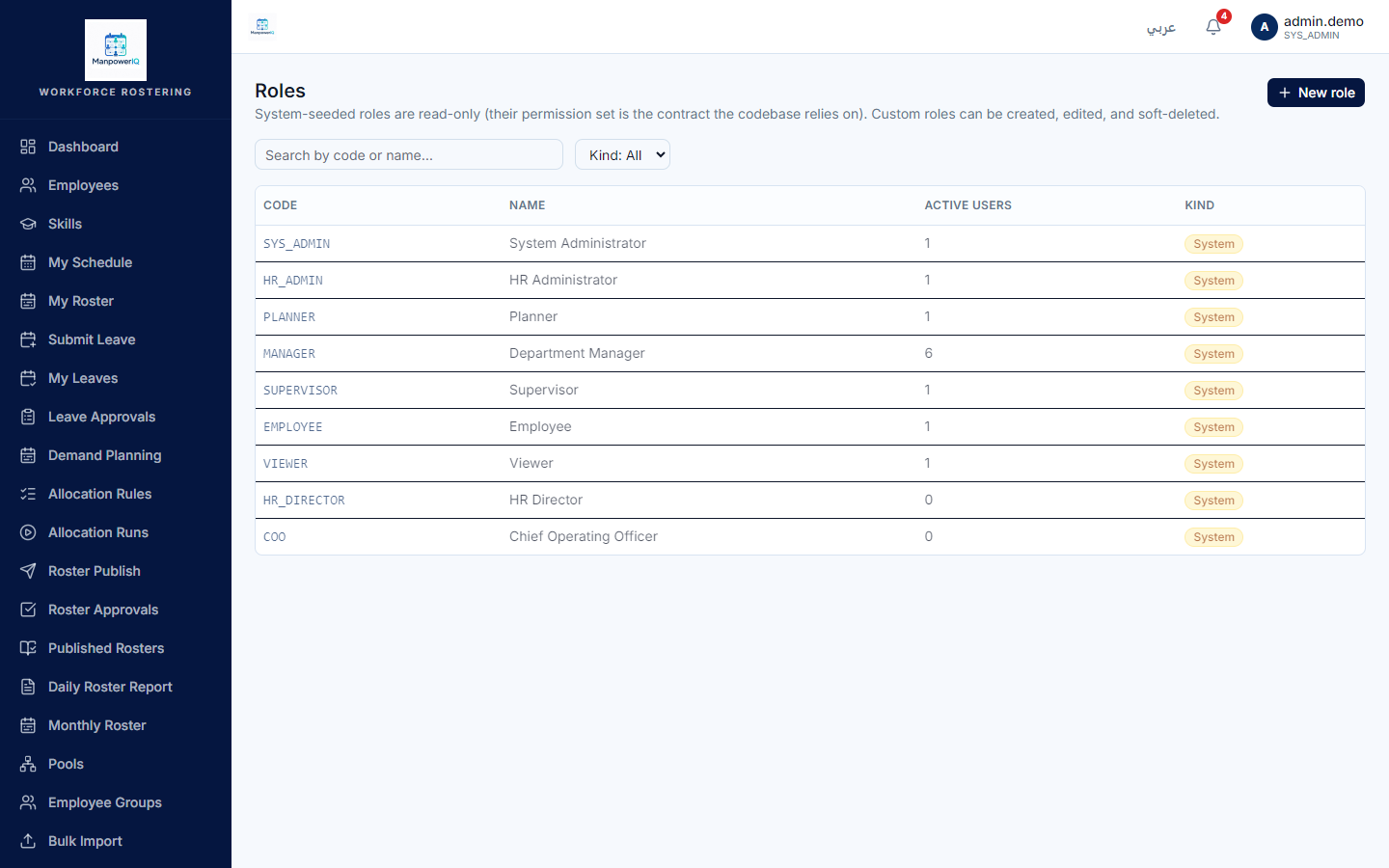
The nine roles
Every business unit has these nine system roles (the original seven plus two added later) — role code — display name — what it is for:
| Code | Name | For |
|---|---|---|
SYS_ADMIN |
System Administrator | Full access — every permission. |
HR_ADMIN |
HR Administrator | Manage employees, skills and certifications; view and configure leave; view the audit log. |
PLANNER |
Planner | Build demand plans and rosters; view the workforce; request cross-pool lending. |
MANAGER |
Department Manager | Approve and publish rosters; approve leave, overtime, cross-pool and early-release; validate attendance. |
SUPERVISOR |
Supervisor | Capture and validate attendance; submit early-release; view rosters and team. |
EMPLOYEE |
Employee | Self-service: view own roster, request leave, view own profile. |
VIEWER |
Viewer | Read-only across employees, skills, certifications, rosters, demand and leave. |
HR_DIRECTOR |
HR Director | HR leadership: attendance import/edit + reconciliation oversight (narrow attendance scope, not full HR-admin). |
COO |
Chief Operating Officer | Executive: attendance review/validate + reconciliation oversight. |
What each role can do (as originally seeded)
Summarised from the role-and-permission seed that ships with the system. Treat this as the seeded baseline, not the final word (see the note below).
SYS_ADMIN— all 97 permissions.HR_ADMIN— manage employees and skills, manage certifications, view leave and configure leave, view own profile, view the dashboard, and view the audit log.PLANNER— create/edit demand plans, view and create/edit rosters, view employees/skills/certs, request cross-pool, view leave, view own profile and the dashboard.MANAGER— view/approve/publish rosters, view demand, approve leave/overtime/cross-pool/early-release, validate attendance, view employees/skills/certs, view own profile and the department dashboard.SUPERVISOR— view rosters, capture and validate attendance, submit early-release, view employees/skills, view leave, view own profile and the department dashboard.EMPLOYEE— view own roster, request leave, view own profile.VIEWER— read-only: view employees, skills, certs, rosters, demand, leave, own profile and the dashboard.HR_DIRECTOR/COO(added after the MIQ-003 baseline) — narrow attendance + reconciliation scopes (import/edit/review attendance, view/validate reconciliation); seeSprint/RBAC_RolePermission_Extract.mdfor their exact grants.
Permissions by capability — examples
A sample of permission codes and the capabilities they gate, traceable to the fact base. Some of these were added in sprints after the original 40-permission seed — the catalog is now 97 permissions — which is why the complete current catalog is larger than the baseline above.
allocation_rule.read/.write/.execute— view, edit and run the allocation rules engine (edit = SYS_ADMIN + HR_ADMIN only; a Planner can run the engine but not edit rule sets).allocation_run.read/.write/.execute/.lock/.debug/.archive— manage allocation runs through their lifecycle.demand.confirm/demand.override— confirm a demand plan; override a locked plan/cell with a reason.pool.read/.write,pool_lending_rule.read/.write— manage pools and the directional lending rules between them.imports.run/imports.view_history— run the Excel import; view all import jobs in the business unit.certifications.read/certifications.manage— view and manage certifications.roster.create— create shift assignments / rosters.
Rules & what's enforced
- Permission required per action. Each protected screen/action names the permission it needs; without it, the action is refused.
- Department scope. A department-scoped grant limits a role to that department only.
- Effective dating. A grant applies only between its effective-from and effective-to dates.
- Business-unit isolation. Roles, role grants, and users are scoped to a business unit; the permission catalog itself is global.
- Super-admin override. A super admin bypasses BU scoping by design — a powerful grant, intentionally limited to trusted use.
What's live vs planned
- Role-based access control is live and enforced across the application — the permission catalog, business-unit roles, department-scoped and effective-dated grants, and the runtime permission check all ship.
- The system seeds a global permission catalog and the nine system roles above in every business unit.
Note. The 7 baseline roles' grants above come straight from the RBAC seed migration (the baseline); later sprints added permissions beyond the original 40 (allocation rules/runs, pools, imports, attendance, lookup admin, and more) and the two extra roles. The verified current matrix — 97 permissions × 9 roles — is recorded in
Sprint/RBAC_RolePermission_Extract.md, and the full canonical role × permission matrix is published in the Developer Guide: RBAC matrix. This page shows the named roles and a representative, sourced picture rather than the full matrix.
Related
- Getting started
- Overview — what is ManpowerIQ
- Business units & multi-tenancy — how BU isolation underpins role scoping.
- RBAC matrix — the full canonical 9-role × 97-permission reference.