Troubleshoot an unfilled run
Goal
Read an allocation run where a demand line couldn't be filled, and find out why a candidate was excluded — the single most common real-world planning moment.
Who can do this
- See the run + which lines are short: anyone with
allocation_run.read. - See why anyone was excluded (the per-rule hard-fail reason):
allocation_run.debug— System Administrator only.
Read this first (finding F6 — the honest limit): a Planner sees only the eligible candidates and who was selected — not the exclusion reasons. The diagnosis you need on an unfilled line ("no lending rule", "cert expired", "on leave") is gated to admin/debug access. If you're a planner staring at a short line and can't see why, that's the product limit, not your mistake — ask an administrator (or someone with
allocation_run.debug) to read the reasons.
Before you start
- An executed (Computed) run with at least one partly-filled line. In the demo, run AR-20260601-002 (plan #46, Demo Container Terminal, SHT-EVE-16) has a partial line.
Steps
- Open the run (
/allocation-runs/{id}). Lines show their fill — a line marked e.g. 1 partial didn't reach its head count.
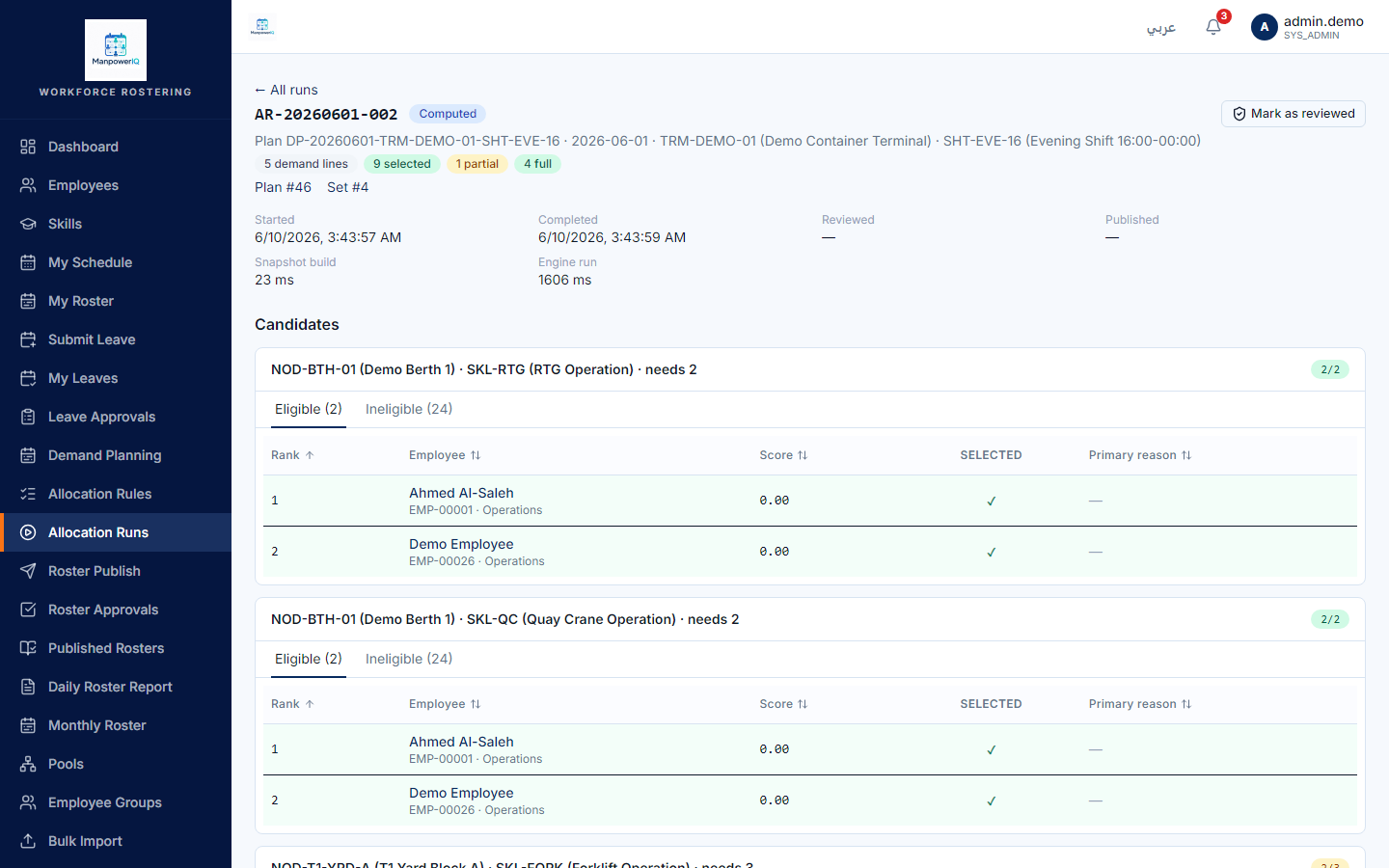
- As an administrator (debug access), expand the Ineligible (N) section for the short line. Each ineligible candidate shows the hard rule that failed and the reason text.
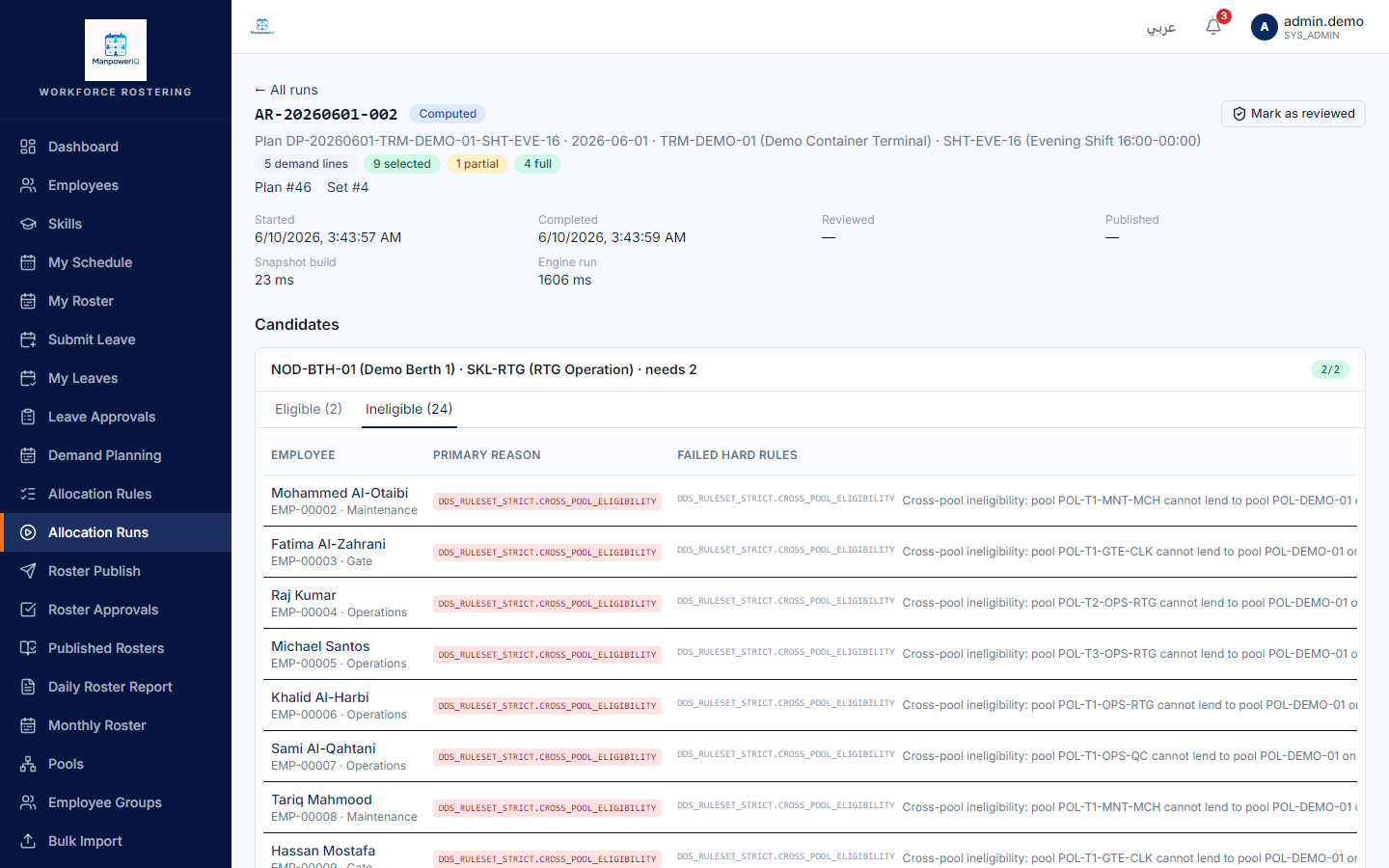
Caption note (F6): the Ineligible reasons above are visible only with
allocation_run.debug(System Administrator). A Planner on this exact screen would see the Eligible lists but not these reason rows.
- Read the reason and act: e.g. cross-pool → an admin creates a Pool-Lending Rule (see Generate a roster); cert expired → the employee's certification must be renewed (note: there is no cert UI — finding F7); on leave → expected; hour/rest limits → the candidate is over a working limit.
What the system does
Hard rules are gates: the first hard failure makes a candidate ineligible and stops further scoring for them — so each ineligible candidate has exactly one primary failing rule. The engine records a reason for every pass/fail; the UI only surfaces the hard-fail reasons in this debug view. See Allocation rules.
What can block you
- No debug access → no reasons. This is the core limitation (F6); there is no planner-facing "why excluded" view in v1.
- Cert reasons can't be fixed in-app: certifications gate allocation but have no management UI (F7) — renewal is via import/API.
- The equalization tier (Below/At/Above) behind a soft score isn't shown anywhere in the UI either (F8).
Troubleshooting
| Reason on screen | What it means | Fix |
|---|---|---|
| Cross-pool ineligibility: pool X cannot lend to pool Y | No lending rule lets X serve Y's demand | Admin adds a Pool-Lending Rule (X→Y, RequiresApproval=false, effective) |
| Leave conflict: … has approved leave … | Candidate is on approved leave that day | Expected — pick another candidate |
| Hour limit / Rest hours / Max consecutive | Candidate is over a working-time limit | Expected guard — adjust demand or use another candidate |
| Cert expiry | A required certification is missing/expired | Renew via import/API (no UI) |